This guide is for regular users. Chefsphere has a Free plan you can use forever, plus optional paid Premium / Pro / VIP subscriptions if you want more power. You can swipe for meals and drinks, plan meals, manage grocery lists, coordinate with partners/family/friends, browse tools and ebooks, watch Chef Lives, track your health, and explore the community feed on the Free plan. You only pay when you choose a paid subscription, rent tools, or buy ebooks.
1. What You Can Do with Chefsphere
Chefsphere is a complete cooking and meal planning platform. On the Free plan you can discover recipes by swiping (like Tinder), plan weekly meals, generate grocery lists, coordinate with your partner/family/friends, browse tools and ebooks marketplaces, watch live cooking streams (Chef Lives), track your health (nutrition, water, sleep, workouts), and engage with the community feed. You can optionally upgrade to Premium / Pro / VIP subscriptions for more swipes, advanced AI, analytics, and group features, and you can also pay when you rent tools or buy ebooks.

2. Create Your Account
- Open Chefsphere web app and click Sign Up.
- Enter your email and create a password, then confirm your email if verification is required.
- Complete the onboarding flow with your preferences, dietary restrictions, and household context.
- Optionally enable Couple, Family, or Friends modules from Personal Zone if you want to share with others.
3. Swipe for Meals and Drinks
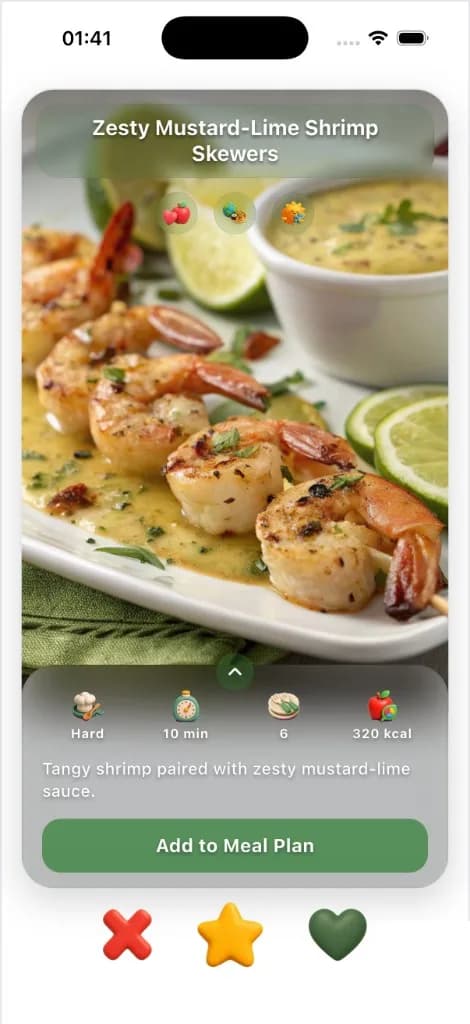
- Go to Swipe for Meals from the navigation to discover recipes by swiping right (like) or left (pass).
- Use Swipe for Drinks to discover drink recipes the same way.
- View your liked, super-liked, and saved recipes in the Recipes section.
- Add recipes directly to your Meal Plan or Grocery List from any recipe page.
4. Meal Planning & Grocery Lists
- Open Meal Plan to create and manage your weekly meal schedule.
- Drag and drop recipes into your meal plan, or let Chefsphere suggest meals based on your preferences.
- Open Grocery to see auto-generated shopping lists from your meal plan.
- Customize grocery lists, check off items as you shop, and view shopping history.
5. Couple, Family, and Friends Spaces
- Open Personal Zone from the navigation.
- Choose Couple, Family, or Friends to create or join a shared space.
- Invite your partner, family members, or friends to join your space.
- Use shared meal plans, grocery lists, chores, events, files, quick notes (couple), polls (family/friends), and messages to coordinate together.
6. Health Tracking & Community
- Open Health to track nutrition, water intake, sleep, and workouts.
- Visit Feed to see what the community is cooking and sharing.
- Browse Community to discover recipes, connect with other users, and participate in discussions.
- Use Dashboard to see your activity summary, stats, and quick access to all features.
7. Tools Marketplace & Ebooks
- Open Tools from the navigation to browse the marketplace for tools and equipment.
- Search, filter, and use maps to find tools near you. Browse for freeāyou only pay when you rent or purchase.
- Open Ebooks to browse digital cookbooks, guides, and educational content.
- Browse ebooks for freeāyou only pay when you purchase an ebook.
8. Chef Lives (Live Streaming)
- Open Chef Lives to watch live cooking streams from chefs and creators.
- Interact with streams through chat, reactions, voting, and polls.
- Apply to become a chef and stream your own cooking sessions.
- Watch streams for freeāsome streams may have pay-per-view or subscription options.
9. Use Chefsphere on Mobile
- Install the Chefsphere mobile app from the App Store or Google Play (when available).
- Sign in with the same account you use on the web.
- Your recipes, meal plans, grocery lists, shared spaces, and all data will sync automatically.
- Enable notifications to receive real-time updates for meal plan changes, grocery updates, shared notes, and community activity.
10. If You Are a Developer or Company
Chefsphere offers paid APIs for companies and developers. You donāt work directly with our backend repositoryāinstead, your team requests access through the API pages, and we set up managed API access for you with documentation and support.
- Visit the API page from navigation to see all available APIs (Recipes, Meal Planning, Live Streaming, Marketplace, Ebooks Commerce, Identity & Compliance, Community Feed, Infrastructure).
- Review pricing cards and features for each API that interests you.
- Click Contact Sales or use the API contact modal to submit your use case, company info, and preferred plan.
- We will provision your API access, provide keys, and give you access to official API documentation.
11. Next Steps
- Start swiping for meals and drinks daily to build your taste profile.
- Create your first meal plan and generate a grocery list.
- Invite your partner, family, or friends to share meal planning and grocery coordination.
- Explore the Tools marketplace and Ebooks when you need equipment or cooking guides.
- Watch Chef Lives to learn from professional chefs and creators.
- Track your health and wellness in the Health section.
- If you're a developer or company, visit the API page and contact sales when ready.