Personal Zone
Two swipes. One dinner.
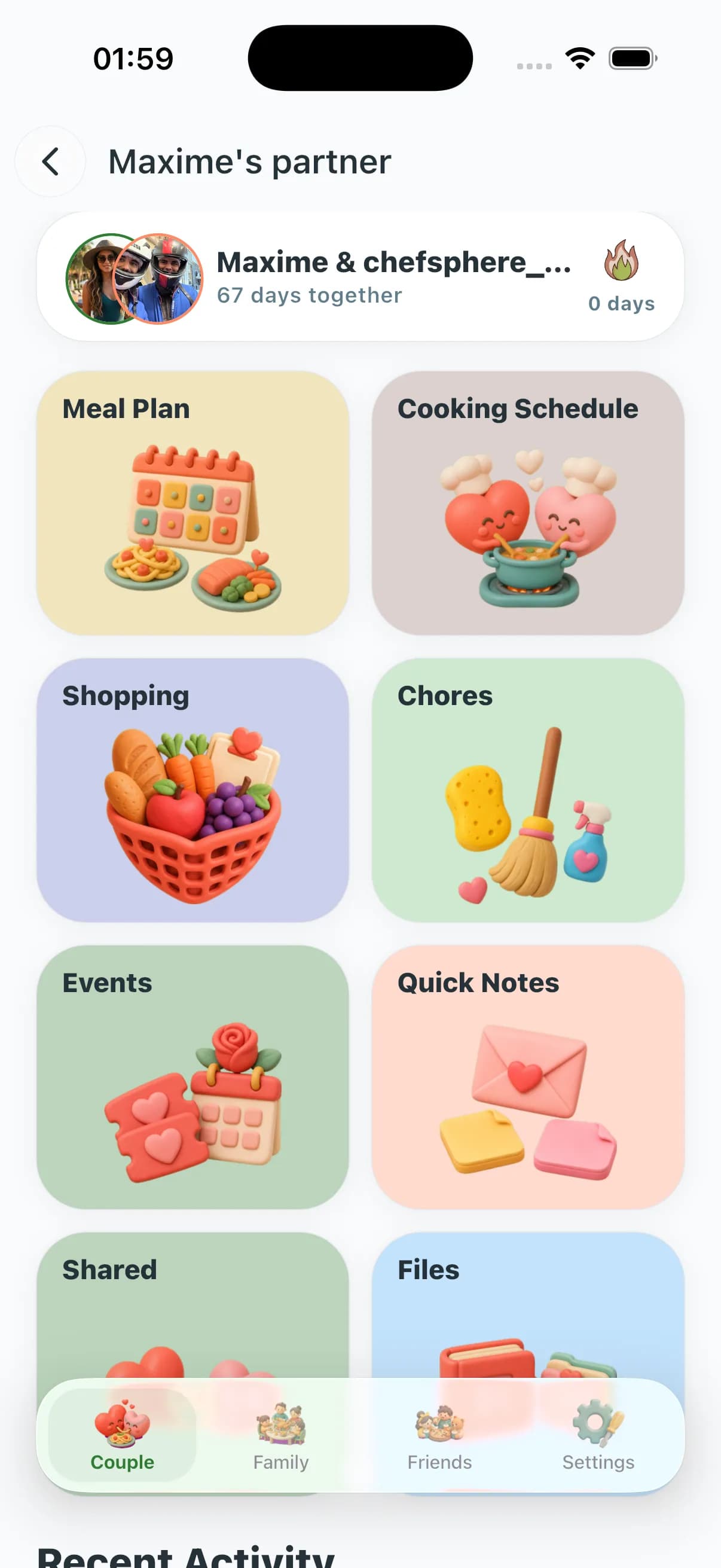
You each swipe your own deck. Same recipe liked by both is a match — it can land on the shared week and the list. Who cooks is on the schedule. Cook Mode on iPhone for the person at the stove.
Read the full couple meal planning page

Why the Couple Zone is a full household operating system, not a shared list
Most "couple meal planning" apps stop at a shared grocery list or a common recipe library. The Couple Zone is built on the observation that couples need five things at once: a meal plan that respects two distinct taste profiles, a fair system for who cooks and who shops, a way to stay coordinated day-to-day (notes, chores, events), a shared file space, and something that rewards the habit of planning together. Apps that do one of these force you back into the group chat for the other four.
The flame streak is the most visible expression of this philosophy. It is not a vanity counter — it is a 365-day commitment loop with named milestones and reward points at 7, 14, 30, 60, 90, 180, and 365 days. At each milestone you unlock something real. That is why couples who use the streak keep planning together; the streak makes the habit visible and the habit makes the relationship feel organized instead of improvised.
The cooking schedule is the other major differentiator. A cooking rotation embedded in a meal plan tells you who cooks dinner on Thursday. A dedicated cooking schedule tells you who cooked what on every day of the last month, shows per-partner statistics, and lets you filter by meal type or partner. When cooking is tracked the same way a calendar tracks meetings, "whose turn is it?" becomes a data question instead of an argument.
What sets the Couple Zone apart feature by feature
Flame streak with 7 named milestones up to 365 days and reward points at each: Week Warrior (7), Two-Week Champs (14), Month Masters (30), Two-Month Strong (60), Quarter Champions (90), Half-Year Heroes (180), Year of Love (365).
Dedicated cooking schedule: create cooking events, pick meal type, assign partner, toggle completion, view per-partner stats, filter by meal type — not just "Alex cooks Monday" buried in a note.
Shared planning can use both partners' preferences, recipe matches, saved recipes, and cooking history to find genuine overlap while keeping each partner's allergens and goals separate.
Conflict resolution UI appears automatically when both partners schedule the same meal slot — surfaces the conflict, proposes a resolution, never silently overwrites.
AI add-meal: generate a completely new recipe with the AI and drop it directly into a calendar slot, not just from an existing recipe bank.
Quick notes with 24-hour TTL so the dashboard stays signal-rich: one pinned note at a time (auto-unpins the previous), max 10 notes visible, pinned notes persist until manually unpinned.
Couple group chat with history: stop bouncing between WhatsApp and the plan — the chat lives beside the calendar, not in a different app.
Events with statistics: track couple events, view completion rates and patterns over time — the same analytics depth as the meal plan, applied to couple life.
Chores with statistics: create, assign, complete, and analyze chore fairness — because dishes and cooking need the same fairness engine.
File sharing with type filters and search: recipe PDFs, meal kit instructions, photos, receipts — all in one place, searchable by type.
Match card visibility control lets you decide whether recipe matches appear when both partners like or super-like the same recipe.
Granular notification settings per activity type (events, chat, chores, files) — you choose what gets pushed.
Meal plan analytics with custom period selection: see what both partners rated 4/5+ over the last 30 days, not just this week.
Replace and reschedule meals with keep-vs-move semantics so the original slot is never accidentally left blank.
Premium = one subscription covers both partners; each keeps a fully independent profile, swipe history, allergens, and macros.
Everything in the Couple Zone
Partner linking via invitation code or shareable link
Shared weekly meal plan informed by two independent preference profiles and recipe matches
Dedicated cooking schedule: who cooks which meal, with partner picker, filters, and statistics
Flame streak with milestone rewards — Week Warrior (7 days) through Year of Love (365 days)
Couple group chat with history
Events management with statistics
Chores management with assignment, completion, and statistics
File sharing with upload, type filters, search, and share-with-partner dialog
Quick notes with 24-hour TTL — one pinned note at a time, auto-unpins the previous
Shared content feed: shared-with-me and I-shared tabs
AI add-meal: generate a recipe with AI and drop it into any calendar slot
Meal plan conflict resolution, replace, and reschedule (keep vs. move)
Meal plan analytics with custom period filters and history
Granular notifications per activity type (chat, events, chores, files)
Match card visibility control in group settings
Premium = one paid subscription, free partner account included
Couple Zone in real life
The 365-day streak couple who run their home like a startup
After 30 days of daily planning together — meals, chores, events — the streak hits Month Masters and unlocks reward points. By day 180 the flame modal shows the full-year target. The app is not their relationship; it is the scaffolding that keeps the relationship from becoming pure logistics.
The "we never agree on dinner" couple
Both partners swipe 15 recipes on Sunday from their own deck. Recipe matches reveal genuine overlap, shared planning locks in three for the week, and the cooking schedule shows who handles each one — with partner stats confirming neither person has cooked five nights in a row.
The training-block couple (runner + strength athlete)
Per-partner macros: high-carb before long runs, higher protein on lift days, shared dinners with per-partner portion ratios. AI swaps a side, not the whole meal. Chores and cooking schedule rebalance automatically on heavy training weeks.
The long-distance weekend couple and the pinned note
One partner pins "pick up wine and charcuterie" as the weekend quick note — it surfaces at the top of the Couple Zone dashboard with a 24-hour timer. The shared shopping list has the exact items, split by who arrives first. No WhatsApp thread required.
Couple Zone — frequently asked questions
What exactly is the flame streak and how does it work?
The flame streak counts consecutive days your Couple Zone is active — meals planned, notes sent, cooking events logged, or chores completed. At 7, 14, 30, 60, 90, 180, and 365 days, named milestones appear in the flame modal and unlock reward points. Losing a streak day requires missing the zone entirely, not just skipping one feature.
How is the cooking schedule different from the meal plan rotation?
The meal plan rotation tells you who is assigned to cook on a given plan day. The cooking schedule is a separate domain: you create dedicated cooking events with a meal type, partner assignment, and completion toggle. You can filter by partner or meal type, view per-partner cooking statistics, and track completion rates over time. It is the difference between "Thursday is Alex's dinner" and a full historical record of who cooked what.
Does my partner need their own paid plan?
No. Premium includes a free partner account — one subscription covers both of you. Each partner keeps a fully independent profile, swipe history, allergens, goals, and macros. Only the shared plan, cooking schedule, events, chores, files, and notes are joint.
How do quick notes work — what is the 24-hour TTL?
Quick notes are short, ephemeral messages at the top of the Couple Zone dashboard. Each note expires after 24 hours by default. You can pin one note at a time — pinning a second auto-unpins the first. Up to 10 notes are visible; pinned notes stay until manually unpinned or replaced.
What happens when both of us schedule the same meal slot?
Conflict resolution triggers automatically. A banner surfaces on the meal plan showing the conflicting entries, and the resolution flow lets you pick a winner, merge, or move one entry to a new slot — or settle it with a mini-game (Taste Clash, Kitchen Tap, or Color Cook) or an AI-proposed compromise. Neither entry silently overwrites the other.
Can we share files and documents inside the zone?
Yes. The Files section supports uploading files, filtering by type, searching by name, and sharing directly with your partner via a share dialog. Recipe PDFs, meal kit instructions, shopping receipts, photos — all searchable without leaving the app.
What if our diets do not fully overlap (e.g., one vegetarian)?
AI keeps each partner's hard constraints fully separate and proposes "same dinner, different protein" substitutions on conflict nights. Hard allergen constraints are never overridden for either partner.
Two swipes. One dinner.
You each swipe your own deck. Same recipe liked by both is a match — it can land on the shared week and the list. Who cooks is on the schedule. Cook Mode on iPhone for the person at the stove.


Keep going
Personal Zone hub
Compare Couple, Family, and Friends zones in one place.
Conflict Games
Settle a recipe standoff with Taste Clash, Kitchen Tap, or Color Cook — the winner decides.
Family Zone
Group chat, polls, chores, events, and per-member portions for the full household.
Friends Zone
Shopping assignment, polls, and group plans for roommates and dinner clubs.
Smart meal planning
How the AI plan engine works across solo, couple, family, and friends.
Grocery & lists
AI grocery list, aisle order, and Community Prices.
Couple chore app
Partner chores, fairness stats, dishes off the argument list.
Cooking schedule app
Who cooks which meal — not a note buried in the chat.