

From AI meal planning
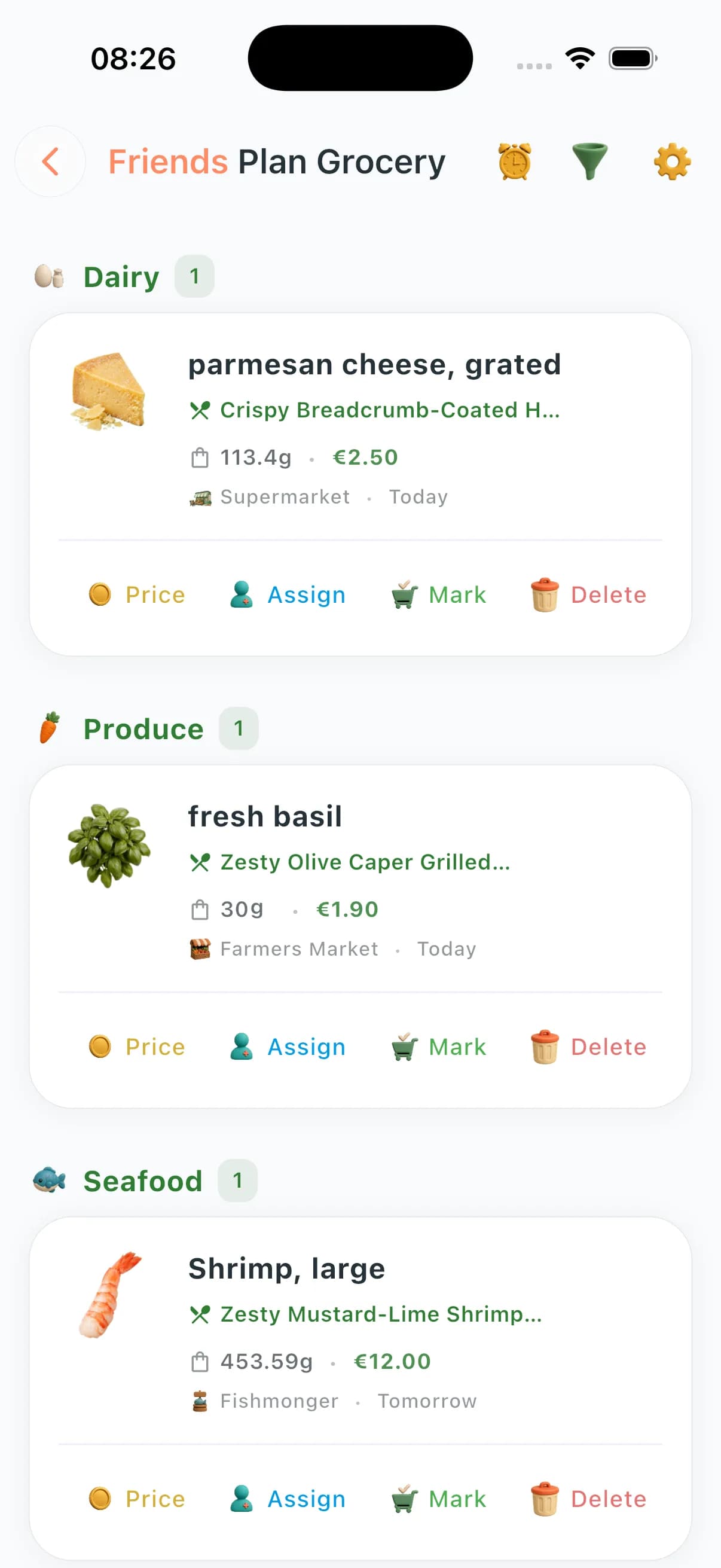
Ingredients roll up automatically from Weekly Plan entries with extraction, merges, per-recipe views, and real-time sync for shared households.
The list is born from the meals you approved — merged quantities, aisle order, who buys what. AI grocery tools (substitutions, list optimization, nutrition gaps) are Premium+. Cook Mode on iPhone when you’re back from the store.
From plan to list
Quantities roll up, duplicates merge, units convert. Zero spreadsheet work.
Real prices
Community Prices show what shoppers actually paid near you this week.
Budget guardrails
Set a weekly cap; the list flags overshoot before checkout.

A normal shopping app stores typed items. ChefSphere connects the whole planning loop: meal-plan generation, private lists, templates, recurring staples, stores, prices, assignments, substitutions, nutrition, routes, analytics, and future shopping needs.
Plan source
Weekly Plan recipes feed the list automatically, including recipe usage, day context, portions, ingredient images, and combine/uncombine controls.
Store source
Items are categorized for shopping flow, stores can be registered, and store views prioritize where you have price history for list ingredients.
Private source
Add standalone items with brands, notes, priority, tags, store, aisle/location, reminders, completion tracking, and actual prices after checkout.
Template source
Repeat weekly basics, pantry restocks, party shops, and staple runs with template-ready items and recurring patterns instead of starting from zero.
Budget source
Personal prices, Community Prices, contribution history, verification, bought-same signals, and price overviews make estimates more realistic over time.
Household source
Assign individual grocery items, see assigned-to-me and assigned-by-me queues, bulk-complete tasks, and keep shared zones moving.
AI source
Premium+ can optimize lists, suggest substitutions with price/nutrition impact, and analyze nutritional gaps against the basket.
Pro source
Pro flows include shopping-route generation, deeper analytics, and future-need predictions so the list becomes a planning loop, not a dead note.
Ingredients roll up automatically from Weekly Plan entries with extraction, merges, per-recipe views, and real-time sync for shared households.
Smart categorisation, aisle-style grouping, and store-aware flows so trolley time matches layout — not alphabetical chaos.
Manual grocery items, search, category filters, store notes, reminders, completion tracking, bulk actions, tags, and actual checkout prices.
Reusable grocery patterns for weekly basics, pantry restocks, party shops, and repeat routines so every list does not start blank.
Rolling estimates, totals against targets, savings insight from plan versus basket — surfaced with the same maths that powers Premium budgets.
Crowd-verified supermarket lines feed budget realism: history, confirmations, neighbours helping neighbours price meals honestly.
ChefSphere AI generates a meal plan from your preferences, health data, and budget target.
Every recipe in the plan contributes its ingredients. Shared items merge across meals — one entry, right quantity.
Items group by category and aisle. The list mirrors how you walk the shop, not how recipes were written.
Where local price data exists, estimates reflect what things actually cost in your area — not a manufacturer's suggested retail guess.
Share assignments with household members, tick items off as you go, and see the whole cart update in real time.
Lock your week Sunday evening. Your list is waiting Monday morning, sorted by aisle so a 20-minute shop is actually 20 minutes.
Two people, one plan — the list merges both tastes and shows who's picking up what. No more "I thought you got the chicken".
Family zones generate plans across members. The list consolidates everything into one trip — grouped for the store layout your family actually uses.
Friends zones share a list. Assign items, see who's done, and coordinate without a 47-message group chat.
Community Prices ground estimates in real local costs. See if this week's plan fits your budget before you walk in, not after.
Bulk-cook plans consolidate ingredients across 5 recipes into clean quantities. No more buying three half-packets of the same lentils.
| Feature | ChefSphere | Typical grocery apps |
|---|---|---|
| Plan sync | Auto-extracted from AI meal plan — no copy-paste | Manual entry only |
| Private lists | Manual items with search, category filters, reminders, tags, stores, and bulk actions | Basic typed checklist |
| Templates & recurring staples | Reusable grocery patterns for weekly basics, pantry restocks, and repeat shops | Rebuild the list every time |
| Aisle ordering | Smart category grouping matching real store layouts | Alphabetical or manual |
| Community Prices | Crowd-verified local store prices feeding budget estimates | No price data |
| Household sharing | Real-time shared list with item assignments for couple/family/friends | Basic share link |
| Budget analytics | Rolling spend vs. plan targets with savings insights | No analytics |
| Cook Mode link | Open Cook Mode on iPhone from a grocery line | Separate recipe app |
ChefSphere vs Mealime, AnyList, and Samsung Food — meal planning app with a grocery list.
Yes. After you approve meals, ChefSphere merges ingredients into one aisle-sorted grocery list and can assign who buys what. That is the loop this page describes. The editable list lives in your account after sign-in.
This page describes the grocery experience. Your editable, live list lives at /grocery after you sign in — where you mark items, adjust quantities, and see real-time updates for your household.
When you confirm a meal plan, ChefSphere extracts all ingredients, merges duplicates across recipes, and builds the list automatically. Change a dinner and the list updates with it.
Yes. Couple, Family, and Friends zones share the same list. Each member sees who added what, and you can assign items to specific people.
Community Prices is a crowd-sourced database of real grocery prices from real stores. Neighbours submit prices they see; ChefSphere uses them to give budget estimates grounded in what things actually cost near you.
You can add items manually — but the real power is auto-extraction from plans. No plan means no auto-fill; manual mode works like a smart notepad.
Yes. You can add private items outside any meal plan, search them, filter by category, attach store or aisle notes, set reminders, bulk update items, and track what was bought.
Yes. Repeat shops can use reusable grocery patterns and recurring staples so weekly basics, pantry restocks, and saved shopping routines do not start from a blank list.
Yes. Items group by category and aisle so your phone matches how you walk the store — not a random alphabetical list.
ChefSphere tracks your weekly grocery spend against targets. Community Prices inform estimates so you can see if this week's plan is realistic before you hit the checkout.
The list from your meal plan is part of the week loop. AI grocery tools — substitutions, list optimization, nutrition analysis — are Premium+.
These pages describe the grocery experience; editable lists stay in your account inside the product.