

Couple Zone (you + partner)
Flame streak with 365-day milestones, dedicated cooking schedule, AI meal plan, group chat, events, chores, file sharing, and quick notes with 24h TTL. Premium includes a free partner account.
You each swipe. A match is real. The shared week and grocery list follow — couple, family, or friends. Cook Mode on iPhone for whoever is at the stove.
Couple · Flame Streak
7→365-day milestones with reward points and per-partner cooking stats.
Family · polls + chores
Polls with real statistics, chore tracking, events, and per-member files.
Friends · assigned shopping
Assign each grocery item to a person — they get their own checklist.

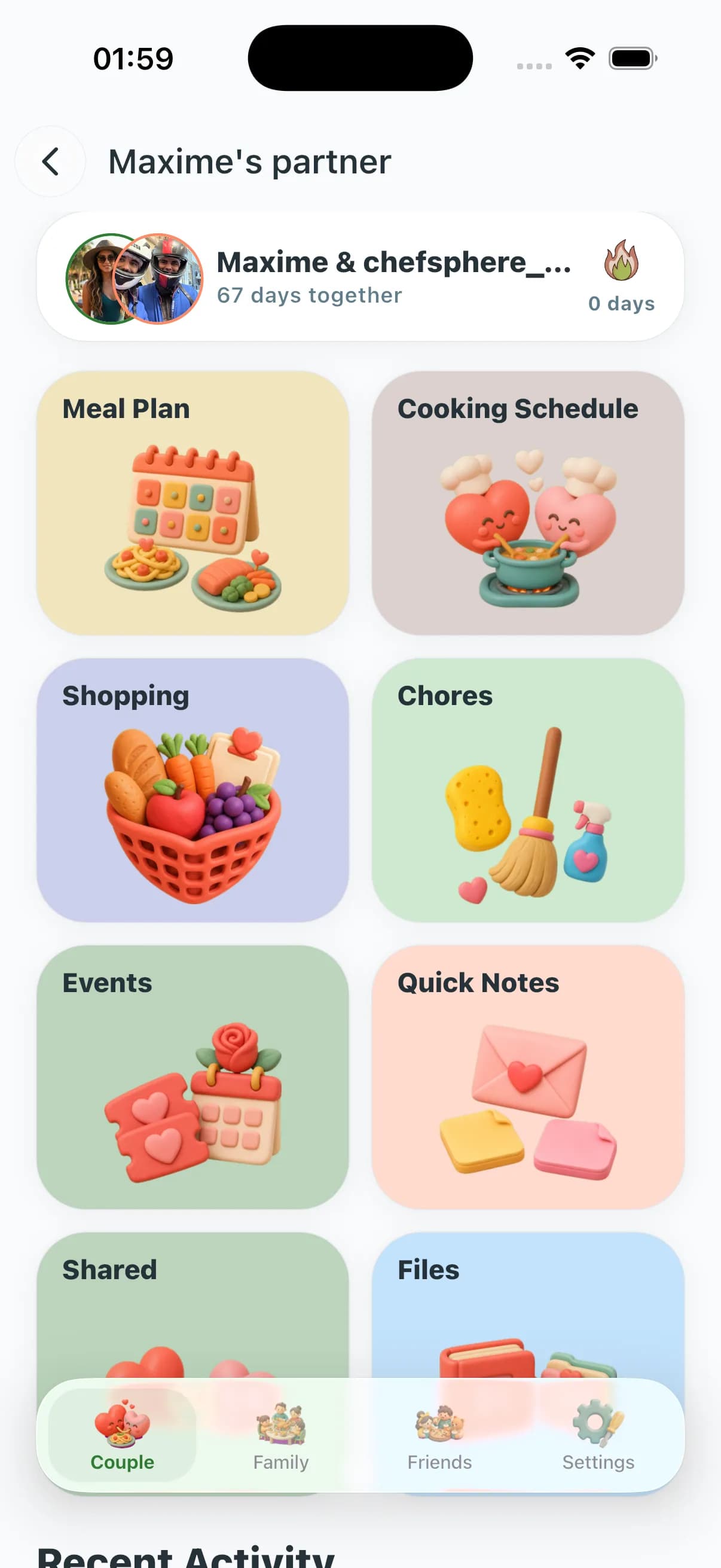
Flame streak with 365-day milestones, dedicated cooking schedule, AI meal plan, group chat, events, chores, file sharing, and quick notes with 24h TTL. Premium includes a free partner account.
Group chat, polls with statistics, chores, events, file sharing, per-member AI portions, picky-eater handling, and conflict resolution — a full household operating hub.
Shopping item assignment (assigned to me vs. by me with completion tracking), polls, group chat, chores, events, and an AI plan that resizes to confirmed attendees.
Send a partner invite by code, or open a Family or Friends group and drop the join link. Members keep their own swipes, allergens, and macros — they just join your plan.
Shared planning can use each member's preferences, allergens, nutrition goals, cooking constraints, budget, swipe history, and recipe matches. Overlap can become the "safe" pool; conflicts stay visible and never override hard constraints.
One press generates a plan that respects everyone: per-member portions, cuisine variety, weekday-vs-weekend cook time, and household budget pulled from Community Prices.
Cook rotation balances effort across the week. Shopping items assign to specific members with completion tracking. Notes, polls, and group chat replace the "where is the bread?" thread.
The shared list updates live as items get bought. Cook Mode times each step on the right phone. Analytics shows what landed (4/5+) and what flopped, so next week's plan is smarter, not random.
Both partners swipe ten recipes a week from their own decks. Recipe matches reveal overlap, shared planning locks in two "safe wins" you both rate 4/5+, and rotates the cook — the cooking schedule shows per-partner stats so it never feels like one person decides every Tuesday.
Plan ahead for the weekend you're actually together: shared shopping list with a "who buys what" split, a pinned quick note for the one item you always forget, and a flame streak that keeps the habit alive between visits.
Per-member taste plus age-appropriate portions: same dinner, different plates. Group polls settle Sunday dinner without a debate. The chore list assigns table-setting to the teenager. The AI keeps allergens flagged and never schedules the "fish disaster" twice in one month.
Budget mode reuses ingredients across three dinners, pulls Community Prices from your nearest stores, and turns leftovers into the next day's school lunch automatically.
Up to six members in one Family group with separate dietary needs — low-sodium for grandma, high-protein for the teen athlete, kid-friendly for the 5-year-old — on one weekly plan.
Shopping assignment ends the "who bought milk again?" problem. Each item is assigned to a specific person with "assigned to me" and "assigned by me" views. One list, one bill, no duplicates.
Six friends, six Sundays, one host per night. A poll settles what's on the menu. The group plan tracks who cooks, who brings wine, and the shopping list assigns items automatically. No three-dessert disasters.
Use a Family group across two cities to share a recipe of the week. Same dish, two kitchens, group chat for commentary, and a tiny ritual that beats any group chat about "what are you eating?"
| Capability | ChefSphere Personal Zone | Typical solo apps |
|---|---|---|
| Member-aware preferences and constraints | Uses member preferences, allergens, nutrition goals, budget, swipe history, and recipe matches | One profile only — partner has to "share" your account |
| Cooking assignments + schedule | Auto-rotate cook duty; dedicated cooking schedule with per-partner stats and history | No cook rotation — manual notes in a calendar |
| Shopping assignments | Assign items to specific members; "assigned to me" / "by me" views with completion tracking | Single grocery list, no delegation |
| Group coordination tools | Group chat, polls with statistics, chores with stats, events management, file sharing | None — coordination happens outside the app in a group chat |
| Partner Premium included | Premium = free partner account; Pro adds Family + Friends zones | Each member pays separately |
| Engagement & habit loop | Flame streak with 365-day milestones and reward points (couple); join-pending gating (family/friends) | No habit loop — app opened only when hungry |
| Real-time sync across devices | Live sync: list, plan, chat, and notes update instantly | Manual refresh; partners desync within a day |
It is the umbrella for ChefSphere's three collaboration modes: Couple Zone, Family Zone, and Friends Zone. Each one has its own page in the app and its own public marketing page — but they share the same engine: shared meal plans, member-level preferences, cooking and shopping assignments, group chat, polls, chores, events, file sharing, and group analytics.
No. Premium includes a free partner account for the Couple Zone. Pro adds Family Zone and Friends Zone, with up to six members per family group and unlimited friend groups. Members keep their own taste profile and allergens regardless of who pays.
Each member swipes recipes independently. Shared planning can use each person's preferences, restrictions, nutrition goals, budget context, history, and recipe matches, while conflicts are weighted by allergen safety and dietary goals so hard constraints are not overridden.
Yes. A grandparent on low-sodium, a teenager on high-protein, a 5-year-old on kid-friendly portions, and a parent on intermittent fasting can all be in the same Family group. The AI generates one menu with per-member portions and substitutions instead of forcing a lowest-common-denominator meal.
The flame streak counts consecutive days your Couple Zone is active — meals planned, notes sent, cooking events logged, or chores completed. At 7, 14, 30, 60, 90, 180, and 365 days, named milestones appear (Week Warrior through Year of Love) and unlock reward points.
Any member can assign a grocery item to another specific member. The assigned member sees it in their "assigned to me" view. The assigner sees it in "assigned by me." When bought, it gets marked complete. If plans change, remove assignment in one tap. No more ambiguous shared lists.
Remove a member from the Friends or Family group and the next plan re-balances. Their personal swipe history stays with them; only the shared overlay is removed. Assigned shopping items return to unassigned.
No. Personal Zone is private to your group. Recipes can be marked private, shared with the group only, or posted to the community — your call, per recipe. Group chat is local to the zone, not a public timeline.
When two people disagree on a recipe, settle it with Taste Clash, Kitchen Tap, or Color Cook — the winner decides.
See how the AI plan engine works for solo, couple, family, and friends — and pick the right entry point.
AI grocery lists, aisle organization, real prices from real stores, and shared lists that stay in sync.
Macros, micros, water, sleep, workouts — and meal plans that adjust to your week, not the other way around.
Vision AI fridge scans, Quick Recipe modes, and a chat that remembers your taste, equipment, and skill level.
These pages are public. Couple, family, and friends live in the app — login stays in the nav if you already have an account.