Meal prep
Prep once. Eat the week you planned.
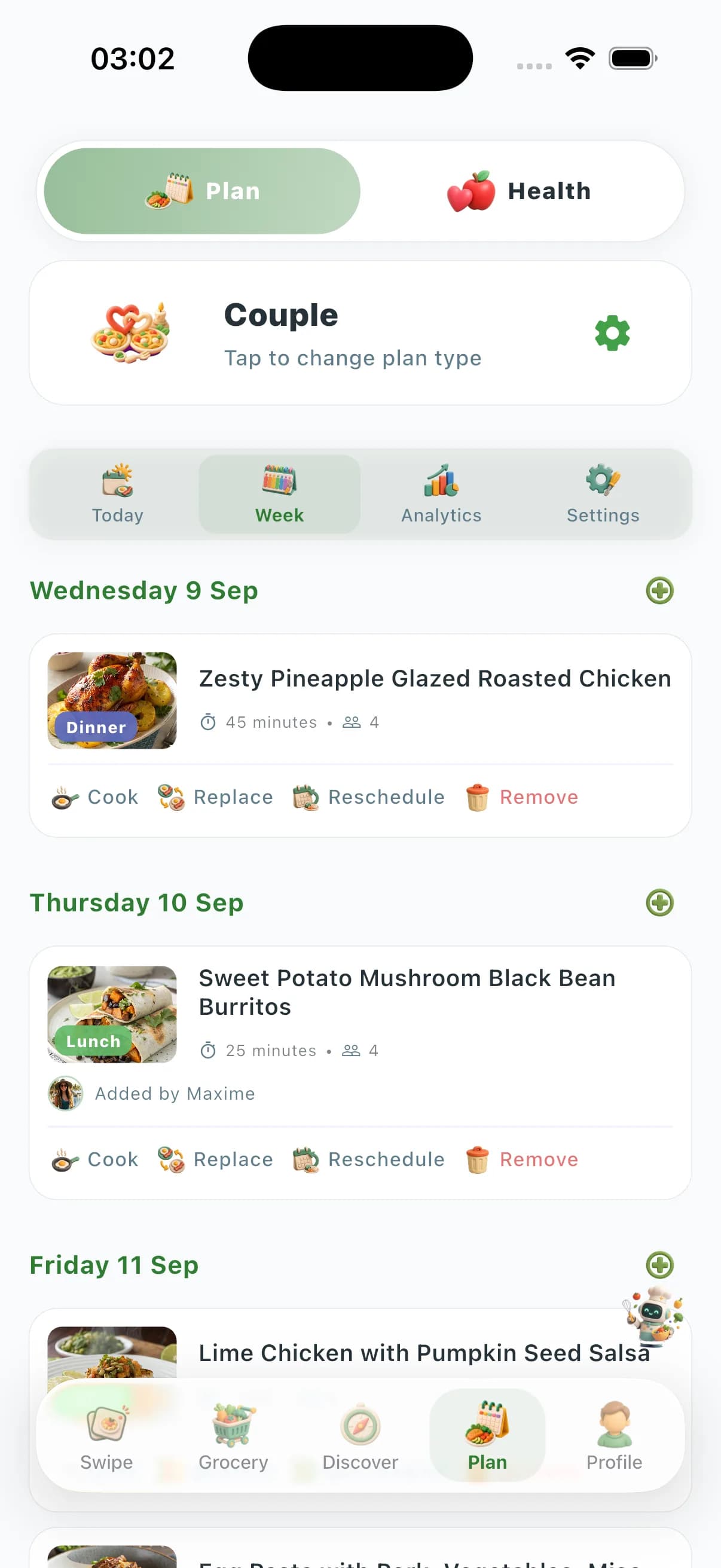
Swipe the keepers. Plan a batch-friendly week. Shop once. Cook Mode on iPhone while you portion. Health numbers catch up after you eat.
Solo, couple, family, friends
Each mode respects every member’s allergies, portions, and likes.
Pick your length
Plan 1 day, 7 days, or build a full month rolling — your call.
Track what you cooked
Mark cooked, swap a slot, or push the whole plan to your grocery list.




Why ChefSphere is a meal prep app, not a PDF template
Batch cooking fails when the plan ignores your pantry, your time window, and who eats what. ChefSphere connects planning, shopping, cooking, and leftovers in one loop.
Batch-first planning
Recipes chosen for prep, not just dinner
AI favors meals that reheat well, share ingredients across the week, and fit your prep window — not random 45-minute projects on Sunday.
One grocery run
Consolidated list with real store prices
Every ingredient from every prep slot rolls into one aisle-organized list. Community Prices shows what your week actually costs at nearby stores.
Portions & containers
Per-meal portions for solo, couple, or family
Scale batches for the right number of containers. Family Zone handles different portion sizes without cooking three separate menus.
Cook Mode
Timed steps while you batch
Cook Mode on iPhone keeps timers, steps, and substitutions while you work through a Sunday prep session or a weeknight batch.
Weekly meal prep in five steps
- 01
Set your prep window
Pick how many days, which meals (lunch, dinner, both), and how long you can cook — 60 minutes on Sunday or two 30-minute blocks.
- 02
Generate a batch-friendly plan
AI builds a week from your swipe history, saved recipes, diet rules, and macro targets — reusing proteins and vegetables to cut waste.
- 03
Shop once
One grocery list, aisle order, optional budget cap from Community Prices. No forgotten items mid-prep.
- 04
Cook & portion
Cook Mode guides the batch. Portion into containers with labels for which day/meal each one is.
- 05
Reheat & learn
Rate reheated meals. The next week's plan gets smarter about what actually survived the microwave and your schedule.
ChefSphere meal prep vs. generic planners
| Capability | ChefSphere | Typical meal prep apps |
|---|---|---|
| Batch-friendly recipe selection | AI picks meals that share ingredients and reheat well | Static templates; you swap recipes manually |
| Taste learning | Swipe history and ratings shape next week | Same generic rotation every week |
| Household portions | Couple/Family zones with per-member portions | Single serving size only |
| Grocery + pricing | One list + crowd-sourced Community Prices | List only; no real store price context |
| Cooking guidance | Cook Mode on iPhone with timers during batch sessions | Recipe text only |
Related
Smart meal planning
AI weekly plans for solo, couple, family, and friends.
Smart meal planningDiet meal plans
Keto, Mediterranean, high-protein, vegan, and more.
Diet meal plansGrocery lists
Aisle-organized lists tied to your plan with Community Prices.
Grocery listsCompare meal apps
ChefSphere vs Mealime, Yummly, Plan to Eat, and more.
Compare meal apps
Meal prep FAQ
Is ChefSphere a meal prep app?
Yes. ChefSphere generates weekly plans optimized for batch cooking: shared ingredients, reheat-friendly meals, consolidated grocery lists, container portions, and Cook Mode on iPhone. Meal prep is a first-class workflow in the same loop as swipe, plan, and grocery.
Can I meal prep for lunch and dinner?
Yes. Choose which meal slots to fill for the week. AI can double-batch a dinner into lunch portions or plan separate lunch-friendly recipes that share grocery items.
Does meal prep work for couples or families?
Yes. Couple Zone and Family Zone scale batch sizes, handle different portion needs, and keep allergens separated while still sharing one prep session and one grocery list.
How is this different from a meal prep PDF or template?
Templates do not know your taste, pantry, budget, or what reheated well last week. ChefSphere learns from swipes and ratings, optimizes ingredient reuse, and updates the list automatically when you swap a meal.
Can I hit macro targets while meal prepping?
Yes. Connect health goals and macro targets; AI biases batch plans toward your protein and calorie targets while keeping prep practical.
Is there a free tier?
Get the app to plan, shop, and cook. Cook Mode is on iPhone. Premium unlocks deeper AI, zones, and advanced planning. AI grocery tools are Premium+.
Start your first prep week
Swipe, plan, shop, cook — then eat the week you prepped. Cook Mode on iPhone.
Nutrition features are planning support only, not medical advice. See /legal/terms and /legal/privacy.