


Nutrition tracking
Calories, protein, carbs, fats and key micronutrients with goals, dietary preferences and analytics that the AI can actually read.
Explore nutritionDinner first: swipe, plan, shop, cook. Nutrition, water, sleep, and workouts are the payoff from what you actually ate — not a separate product you have to finish before dinner.
Four signals
Nutrition intake, hydration, sleep quality, and workout volume — one dashboard.
Closed loop with meals
Hard lift day raises protein automatically; rest day dials calories down.
Opt-in by surface
Choose what feeds the planner. Nothing is shared without your toggle.

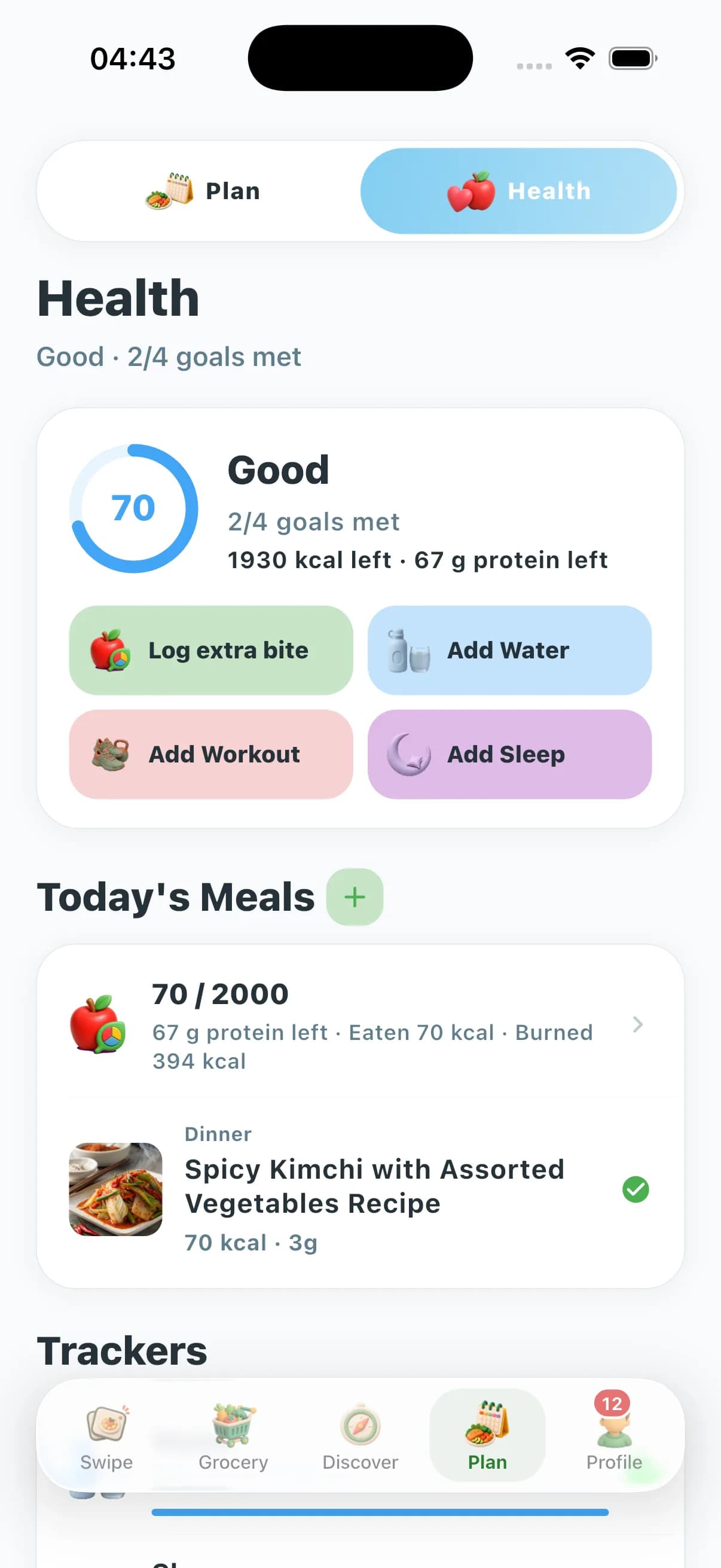
Pick a focus — fat loss, muscle, energy, pregnancy support, diabetes-aware eating, recovery or longevity. ChefSphere stores it as a goal, not a slogan.
Meals, water, sleep windows and workouts. Quick entries are the priority; nothing requires a wearable, though imports stay possible.
Analytics show 7- and 30-day patterns: protein adherence, hydration consistency, sleep debt, training volume — signals that help contextualise planning.
When you connect modules, the planner adjusts portions, swaps recipes and times carbs around training instead of reusing the same template forever.
A short weekly review tunes goals and reminders. Achievements keep streaks visible without turning health into a slot machine.
Most apps stop at a chart. ChefSphere reads nutrition, water, sleep and training as four inputs to one decision: what should this week’s meals look like? When you log a heavy strength session, the planner can lift protein and time carbs around it. When you log poor sleep three nights in a row, it can soften aggressive deficits and lean on satiety-friendly recipes instead of pushing through.
Hydration is treated the same way. Hot-climate weeks, pregnancy phases and long endurance sessions can inform user-set water targets, and the planner pairs them with electrolyte-aware ideas rather than ignoring the context. Nothing is automatic by default — every connection between modules is opt-in and explained in your privacy settings.
Because the trackers, recipes, grocery list and meal plan share one product experience and preference layer, you avoid the usual integration tax: no third-party glue, no exporting CSVs to a coach, no copy-pasting macros into a separate planner. The meal plan and the trackers stay connected in the same ChefSphere workflow.
The result is meal planning that respects how a real week actually feels — different from a “AI guesses your day from your gender and age” template, and different from a calorie counter that never adjusts back.
Track macros against a goal you set, keep hydration visible beside appetite cues, and let meal planning suggest satiety-friendly recipes when sleep is short.
Log sessions and protein intake side by side; the planner pushes high-protein recipes on training days and recovery-friendly ones on rest days.
See where energy dips line up with low water, short sleep or skipped meals — and let the planner avoid recipes that historically left you flat at 4 p.m.
Higher hydration targets, protein-forward meals and gentle reminders. Always paired with a clear note that your clinician’s plan comes first.
Macros, fibre and meal cadence visible together; ChefSphere preferences flag recipes that match your dietary guidance from a qualified professional.
When sleep drops and training volume spikes, the planner can ease intensity, prioritise hydration and lean on familiar, low-friction meals.
Track fibre, plant variety and protein consistency over months; analytics show real trends rather than a one-week dopamine hit.
Log long sessions and the planner can place carb-forward meals before, during and after — with hydration goals scaled to the session, not your office day.
| Dimension | ChefSphere Health Tracking | Most calorie-only apps |
|---|---|---|
| Scope | Nutrition, hydration, sleep and training in one suite. | One pillar, usually calories. |
| Connection to meal planning | Trackers feed AI meal planning when you opt in. | Logs sit in isolation; you replan by hand. |
| Privacy posture | Per-module opt-ins, no ad targeting on health data. | Often bundled with ad networks or vague exports. |
| Households | Couple, family and friends zones with per-member preferences. | Single-user accounts; sharing is a workaround. |
| Motivation system | Achievements tied to real adherence, not vanity badges. | Streak loops disconnected from real planning context. |
| Pricing & lock-in | Free tier covers basic tracking; cancel anytime. | Paywalls on basic charts and frequent re-prompts. |
Calories, protein, carbs, fats and key micronutrients with goals, dietary preferences and analytics that the AI can actually read.
Explore nutritionDaily hydration with reminders, streaks, achievements and history — a real signal, not a number you forget by 11 a.m.
Explore hydrationSleep entries, goals and trends framed as a recovery signal beside training load and macro targets.
Explore sleepSessions, volume and goals with achievements — the load context behind protein priority and refeed days.
Explore workoutsNo. It is an everyday tracker. Logs and analytics support your goals but they do not diagnose, treat or replace advice from a qualified professional. For clinical conditions, follow your clinician.
When you opt in, the planner reads goals and recent trends — protein adherence, hydration, sleep, training volume — and adjusts portions, recipe choices and timing. You always see why a swap was suggested.
No. Manual logging is the default. If you choose to import from a third-party source, you control the connection and can disconnect at any time.
Imports for selected metrics are available where the platform allows it. They are opt-in and clearly listed in settings; nothing connects automatically.
Achievements are tied to real adherence — water streaks, protein consistency, training cadence — and are visible in your profile. They never gate core features.
Free includes basic nutrition tracking and access to the public hub pages. Premium adds full Health Tracking Suite features connected to AI meal planning. Pro extends them across Family and Friends Zones.
Each family member keeps their own logs and preferences. Family Zone aggregates plans and grocery while respecting per-person dietary needs.
Health data is never sold. It is used to deliver tracking and, when you opt in, to inform AI meal planning. You can export or delete it from settings.
ChefSphere health tracking is informational planning support only and is not a substitute for medical advice, diagnosis or treatment. For clinical conditions — including pregnancy, diabetes, eating disorders or any therapy you follow — consult a qualified professional and follow their plan. Use these tools as everyday support, not a medical device. See /legal/terms, /legal/privacy and /legal/ai-disclosure.
These pages explain the suite. Interactive logs, charts and goals run in the app at /health after you sign in.